


Grab - Taxi & Food Delivery
4.811.95K Reviews
App Specs
- Version
- 5.424.0
- Updated On
- License
- Free
- Downloads
- 100,000,000+
- Developer
- Grab Holdings
- Categories
- Travel & Local
- Platform
- Android
Screenshots
 Analysis by AppCompare
I think the best way to judge Grab - Taxi & Food Delivery is not as a magic replacement for every travel or meal app, but as a practical choice when you want a few everyday errands handled in one place. It is a free Travel & Local app from Grab Holdings, and its mix of rides, food delivery, and groceries can be useful when your plans change during the day. The real question is whether those services suit the places you go and the way you prefer to get around.
Choose it for convenience, not just a long feature list
Before making it your default, I would think about which task you repeat most. If you often need a ride and occasionally want food brought to you, having both in one app can reduce the small friction of switching between services. If you only order groceries or only take taxis, a dedicated local service may be a better fit if it gives you the selection or routine you already rely on. The advantage here is consolidation; it does not automatically mean every option will be the best one for every trip or meal.
Location matters, too. The app is most useful when its ride and delivery choices are available where you are, and when the pickup point is easy to describe. I would check the available choices for a specific trip or meal before building a routine around it. For a traveler, that means opening the app while connected and reviewing what appears nearby; for a resident, it means paying attention to which services are actually practical around home and work.
Where having rides and delivery together helps
A realistic day might start with a ride across town, continue with a lunch order during a busy work break, and end with groceries arriving when you would rather stay home. Keeping those needs in one place can make the day feel less fragmented. It is especially handy when rain, a tight schedule, or an unexpected change makes walking to a restaurant or arranging transport less appealing.
There is also a useful planning habit: set the destination or delivery address carefully before confirming. A saved or correctly placed location can prevent confusion at a busy entrance, while a clear pickup point can make meeting a driver easier. I would still check the address and the trip details each time rather than assume the app has chosen the right entrance or building. That small pause is more valuable than rushing through the final confirmation screen.
For food, I find it sensible to decide whether convenience or choice matters more on a particular evening. Delivery can help when leaving home is awkward, but browsing a broad selection can also turn a quick decision into a long one. I would narrow the search by what I actually want, then compare the restaurant details and order summary before placing the order. That keeps the app useful rather than letting endless scrolling take over.
When another approach may suit you better
Grab is not automatically the right answer for someone who prefers to walk, cycle, use public transport, or order directly from a restaurant. Those alternatives can make more sense for a short trip, a familiar route, or a meal where direct contact with a particular business matters more than having several services together. I also would not treat a ride-booking app as a substitute for checking local transport options when a route is well served by buses or trains.
Worth Reading Before You Choose

Baby Panda World Brings Quick Play to Modern Phones, but Its Game Library Feels Busy

ESPN’s Live Game View Makes Following Close Games Easier

QuizzLand Review: A Good Fit for Short Trivia Breaks, Not Every Player

Basketball Stars: Multiplayer Is Fast, but Can It Recover When Matches Go Wrong?

WEBTOON Turns Phone Updates Into a Better Reading Routine

Link to Windows Runs on Shared Habits, Not Social Feeds
There is a trade-off in relying on one app for several routines: convenience becomes tied to the choices and availability shown in that app. If the option you want is not available at that moment, having another way to travel or eat is still worthwhile. I would keep a simple backup plan, especially for time-sensitive trips, rather than assuming a ride or delivery will always fit the schedule.
Switching does not need to mean abandoning the services you already use. Try one ordinary ride or one uncomplicated food order first, then decide whether the steps and choices suit you. That gives you a fair comparison with your usual taxi, restaurant, or delivery routine without changing everything at once. The app has an average rating of 4.8 from around 16 million ratings, and more than 100 million installs, which suggests it has broad reach, but your own experience will still depend on the local options you see.
Getting Around with Ease
Firstly, let's talk about the transportation feature. Imagine you're late for a meeting or simply want to explore the city without worrying about parking. With Grab - Taxi & Food Delivery, you can book a ride in just a few taps. The app is incredibly intuitive, even for those who are not tech-savvy. It pinpoints your location accurately, thanks to its robust GPS system, and connects you with nearby drivers in seconds.
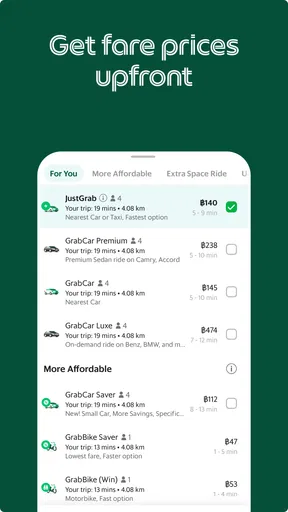
What I find impressive is the variety of transport options available. Whether you need a standard ride, a luxury vehicle, or even a bike, Grab has got you covered. It's like having a personal chauffeur at your fingertips. Plus, the pricing is transparent, so no more surprises at the end of your trip. Just sit back, relax, and enjoy the ride.
Culinary Adventures at Your Doorstep
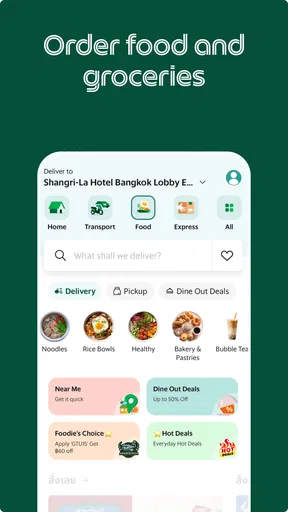
Now, let's dive into the food delivery side of things. Picture this: it's raining cats and dogs, and the thought of stepping out for dinner seems like a nightmare. Grab's food delivery service is here to save the day. The app connects you with a myriad of local restaurants and food stalls, offering anything from gourmet dishes to local street food.
Browsing through the app feels like flipping through a menu at a restaurant. The options are endless, and you can filter by cuisine, price, or even dietary preferences. Once you've made your choice, placing an order is a breeze. You can track your meal in real-time, and the delivery is often quicker than expected. It’s like having a personal butler who knows exactly what you’re craving.
User-Friendly Features
Let’s talk about some nifty features that make Grab - Taxi & Food Delivery stand out. One of the highlights is the in-app wallet, which makes transactions seamless and secure. You can top up your balance easily and use it for both rides and meals. It’s a one-stop-shop for all your commuting and dining needs.
I also appreciate the app’s loyalty program. Every time you use Grab, you earn points that can be redeemed for discounts and special offers. It’s a great way to save money while indulging in convenience. Plus, the customer service is top-notch. Any issues, and they’re just a message away, ready to assist you.
Checking the practical details
For a first order or ride, I would treat the final review screen as part of the decision, not a formality. Check the destination, pickup point, selected service, and total shown before confirming. For a meal, look over the basket and delivery details; for a ride, make sure the pickup spot is somewhere you can reach and recognize. These checks are especially useful at malls, office buildings, and other places with several entrances.
If you are wondering whether it can replace separate apps, my answer is: sometimes, but I would not force that switch. The main benefit is having transport and ordering options under one roof, while a specialist app or a direct call may suit a particular restaurant or journey better. I would compare the actual choices on the day instead of assuming one service will always be cheaper, quicker, or more convenient.
The app is rated for Everyone and is free to download, so it is easy to try without committing to a paid installation. Its current version is 5.412.0, and it has been available since May 30, 2013. Those details tell me it is an established app, but the useful test is still whether its local services match your routine. The minimum operating system is 7.0, a practical point to check if you are installing it on an older device.
For groceries, I would use the same deliberate approach as with restaurant orders: decide what you need first, then check the available items and delivery details before submitting. This is more helpful for a planned top-up than for an urgent item you need immediately, because the app’s usefulness depends on what is offered in your area and at that moment. Keeping a short shopping list ready can make the process quicker and reduce forgotten essentials.
The Verdict
All in all, Grab - Taxi & Food Delivery is a game-changer for anyone looking to simplify their daily routine. It's reliable, efficient, and packed with features that cater to a wide array of needs. Whether you’re looking for a quick ride or a delectable meal delivered to your doorstep, Grab ensures a smooth and satisfying experience.
So, next time you’re in a pinch, remember that convenience is just a tap away. Download Grab, and let it revolutionize the way you travel and eat. Trust me, once you start using it, you’ll wonder how you ever managed without it.
Who I would recommend it to
I would suggest trying it if you regularly arrange rides, order meals, or want grocery delivery in places where the app has useful choices. It is also a sensible option for someone who values having several common errands accessible through one account rather than keeping separate apps for every task. With around 12,000 written reviews alongside its large audience, there is plenty of public feedback to browse, but I would still judge it by a small, low-stakes trial in your own neighborhood.
I would be more cautious if you depend on a particular transport provider, need a very specific restaurant selection, or have a route where public transit or walking is simpler. It may also be a poor fit if you dislike managing orders and trips through an app or would rather arrange directly with a local business. In those cases, Grab can remain a backup rather than becoming your everyday default.
A sensible way to make it part of your routine
My recommendation is to begin with the task that causes you the most hassle. Try a straightforward ride when you have time to check the pickup, or place a familiar meal order when you are not relying on it for a strict deadline. Notice whether the choices, confirmation steps, and timing work for you. Once you know how it behaves in the places you frequent, you can decide whether the convenience of combining rides, food, and groceries is worth keeping it in your regular rotation.
Pros
- User-friendly interface and easy navigation.
- Wide range of services in one app.
- Reliable real-time tracking.
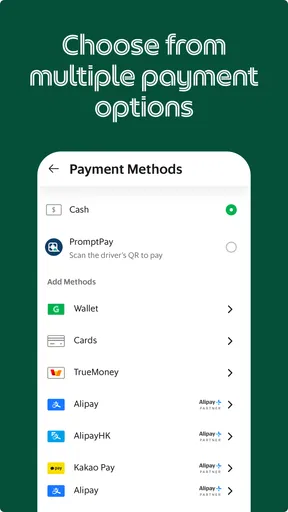
- Multiple payment options available.
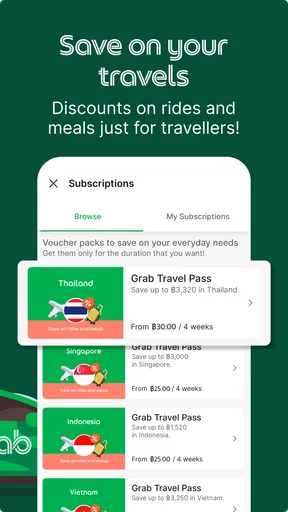
- Frequent promotions and discounts.
Cons
- Limited availability in some regions.
- Occasional surge pricing issues.
- Customer support response times vary.
- App can be data-intensive to use.
- Some features require strong internet.
FAQs for Grab - Taxi & Food Delivery
What services does Grab provide?
Grab offers a comprehensive range of services, including ride-hailing, food delivery, grocery shopping, and package delivery. Whether you're looking to book a taxi, order a meal from your favorite restaurant, or get groceries delivered to your doorstep, Grab provides a convenient, all-in-one platform for your needs.
How do I book a ride on Grab?
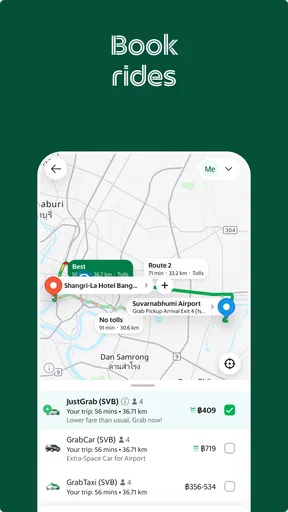
To book a ride on Grab, simply open the app and enter your pickup and drop-off locations. The app will display available drivers near you, allowing you to choose the most suitable option based on estimated arrival times and fare rates. Once confirmed, you can track your driver's arrival in real-time.
Is Grab available in my area?
Grab is widely available across Southeast Asia, including countries like Singapore, Malaysia, Indonesia, and Vietnam. However, availability may vary by city and region. To check if Grab operates in your area, you can visit their official website or download the app and input your location details.
What payment methods does Grab accept?
Grab accepts a variety of payment methods for your convenience. You can pay using credit or debit cards, GrabPay wallet, or even cash in some regions. Additionally, Grab often offers promotions and discounts, making it worthwhile to explore different payment options within the app.
How does Grab ensure safety and reliability?
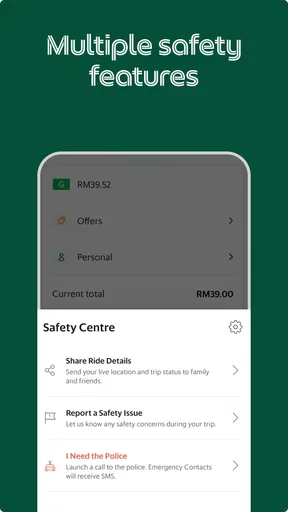
Grab prioritizes safety and reliability through various measures. This includes thorough background checks for drivers, real-time ride tracking, and an in-app emergency button. Additionally, Grab provides 24/7 customer support to address any concerns, ensuring a secure experience for all users.


